
📌 About
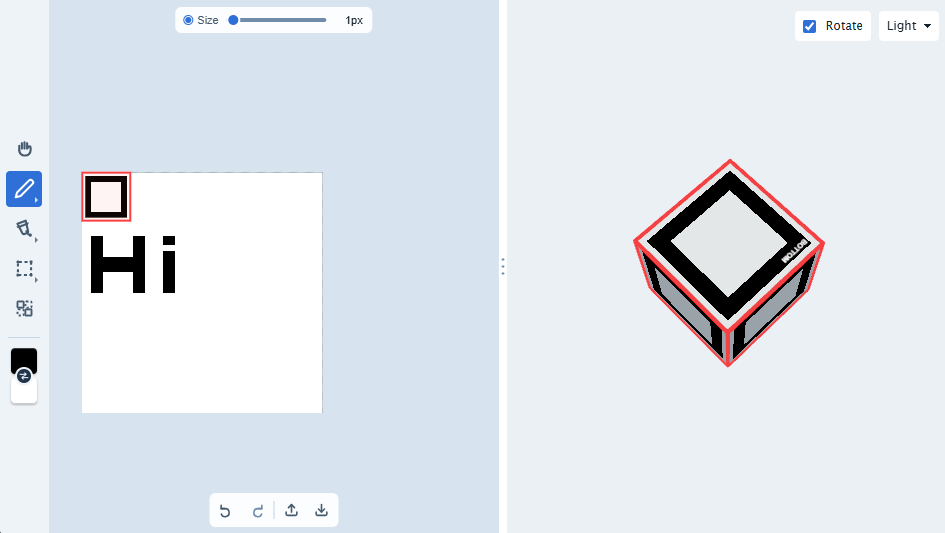
Browser-based library for editing pixel-art textures: brush, fill, select, and UV region tools, undo/redo, and zoom/pan behind one PixelArtCanvas API.
💡 Features
- Brush painting: adjustable size, opacity, and primary/secondary color, plus an erase mode clearing pixels with the same brush
- Paint-bucket fill: flood-fill a connected region of same-colored pixels
- Rectangle and shape select: drag out a rectangle or select a connected region
- UV regions: create/move/delete rectangular UV regions independently of painting, via the
uvvalue object; - Undo/redo: every edit is emitted with the commands that undo it, and a canvas binds to the undo history its host passes in;
- Zoom & pan: wheel-based zoom with configurable sensitivity and range, plus middle-drag panning and left-drag panning while a pan modifier is held;
- Transparency support: checkerboard background renders beneath transparent pixels
💃 Getting Started
This package is available in the Node Package Repository and can be easily installed with npm or yarn.
$ npm i @jolly-pixel/pixel-draw.renderer
# or
$ yarn add @jolly-pixel/pixel-draw.renderer
👀 Usage Example
import {
  PixelArtCanvas
} from "@jolly-pixel/pixel-draw.renderer";

const container = document.querySelector<HTMLDivElement>("#editor-container");
if (!container) {
  throw new Error("Missing #editor-container");
}

const manager = new PixelArtCanvas(container, {
  texture: {
    size: { x: 64, y: 64 }
  },
  defaultMode: "paint",
  backgroundColor: "#263238",
  zoom: {
    // No `default`: computed to fit the whole texture inside `container`.
    min: 1,
    max: 32
  },
  brush: {
    size: 3
  }
});

manager.onResize();
manager.centerTexture();

manager.brush.primary.set("#FF6600", 0.8);
manager.brush.secondary.set("#3366FF");
manager.mode = "fill";
Loading an existing texture:
const img = new Image();
img.src = "/assets/sprite.png";
await img.decode();
manager.texture = img;
See
@jolly-pixel/editor.pixel-artfor the UI layer (a Lit-based toolbar panel drivingPixelArtCanvas) and itsexamples/demo (painting a live Three.js texture).
Modes
mode selects how left-click/drag is interpreted.
"paint": draw with the brush"erase": draw with the brush, writingbrush.erase(transparent by default)"move": pan the camera"fill": flood-fill the clicked region"select": select, move, copy, and delete a rectangular or shape-selected region; setmanager.tools.select.shape = truefor connected-region selection"uv": select and drag UV regions; regions are created programmatically viamanager.uv.create(...), not by clicking
Wheel input zooms from any mode unless it arrives with a held Ctrl key in "paint" or "erase" mode. Middle-drag, or left-drag while shortcuts.panHeld is set, pans from any mode; a plain left-drag pans only in "move" mode. In "paint" and "erase" modes, Ctrl+wheel input increases (scroll up) or decreases (scroll down) the brush size, except while shortcuts.panHeld is set. A touchpad pinch, which browsers report as Ctrl+wheel input without a held Ctrl key, always zooms.
TIP
Read PixelArtCanvas.md for the full behavior, and the Keyboard shortcuts section below.
Keyboard shortcuts
The canvas does not listen to the keyboard and ships no default keys. The host binds its own keys to manager.shortcuts, which routes each intent to the current mode:
| Intent | Member |
|---|---|
| Copy, paste | copy(), paste() |
| Undo, redo | undo(), redo() |
| Delete the selection or UV region | delete() |
| Rotate the selection or UV region | rotate("cw"), rotate("ccw") |
| Flip the selection | flipHorizontal(), flipVertical() |
| Pan with a left-drag | panHeld = true while the key is down |
| Draw a straight line | lineHeld = true while the key is down |
| Drag a UV region off the grid | snapBypassHeld = true while the key is down |
keyboard.bind("Mod+z", () => manager.shortcuts.undo());
keyboard.bind("r", () => manager.shortcuts.rotate("cw"));
Each method returns true when it handled the intent, so the host knows whether to prevent the browser default.
TIP
Read input/CanvasShortcuts.md for the full behavior.
Undo/redo
Disabled by default. Pass a PixelArtCanvasHistory, such as StandalonePixelHistory from @jolly-pixel/asset.pixel-art, and (optionally) track button-enabled state:
import { StandalonePixelHistory } from "@jolly-pixel/asset.pixel-art/client";

const manager = new PixelArtCanvas(container, {
  history: new StandalonePixelHistory({ limit: 20 }),
  onHistoryChange: ({ canUndo, canRedo }) => {
    undoButton.disabled = !canUndo;
    redoButton.disabled = !canRedo;
  }
});

manager.undo(); // false without a history or with nothing to undo
manager.redo();
TIP
Read PixelArtCanvas.md and history/PixelHistory.md.
📚 API
PixelArtCanvasPixelBufferPixelDocumentStateColorPalettePixelCommand- Pixel history
- Normal map
Serialization- Integration primitives
Internal
🧩 Types
Shared value types used across the public API:
type Vec2 = {
  x: number;
  y: number;
};

type Mode = "paint" | "erase" | "move" | "fill" | "select" | "uv";
type ColorInput = string | Color;

interface SelectionRect {
  x: number;
  y: number;
  width: number;
  height: number;
}

export interface RGBA {
  r: number;
  g: number;
  b: number;
  a: number;
}
🧪 Benchmarks
The default command measures PixelBuffer, editing tools, undo grouping, color conversion, and normal map generation without a DOM. The browser command starts Vite and Chromium to measure canvas synchronization and frame rendering.
pnpm --filter @jolly-pixel/pixel-draw.renderer bench
pnpm --filter @jolly-pixel/pixel-draw.renderer bench:browser
Use -- --list to inspect the headless suites. Filtering and measurement rules are documented by @jolly-pixel/bench.
Contributors Guide
If you are a developer looking to contribute to the project, you must first read the CONTRIBUTING guide.
Once you have finished your development, check that the tests (and linter) are still good by running the following script:
$ pnpm run test
$ pnpm run lint
CAUTION
In case you introduce a new feature or fix a bug, make sure to include tests for it as well.
License
MIT