Built-In Shapes
All shapes below are registered automatically by VoxelRenderer. They are also available standalone via BlockShapeRegistry.createDefault().
Shape Reference
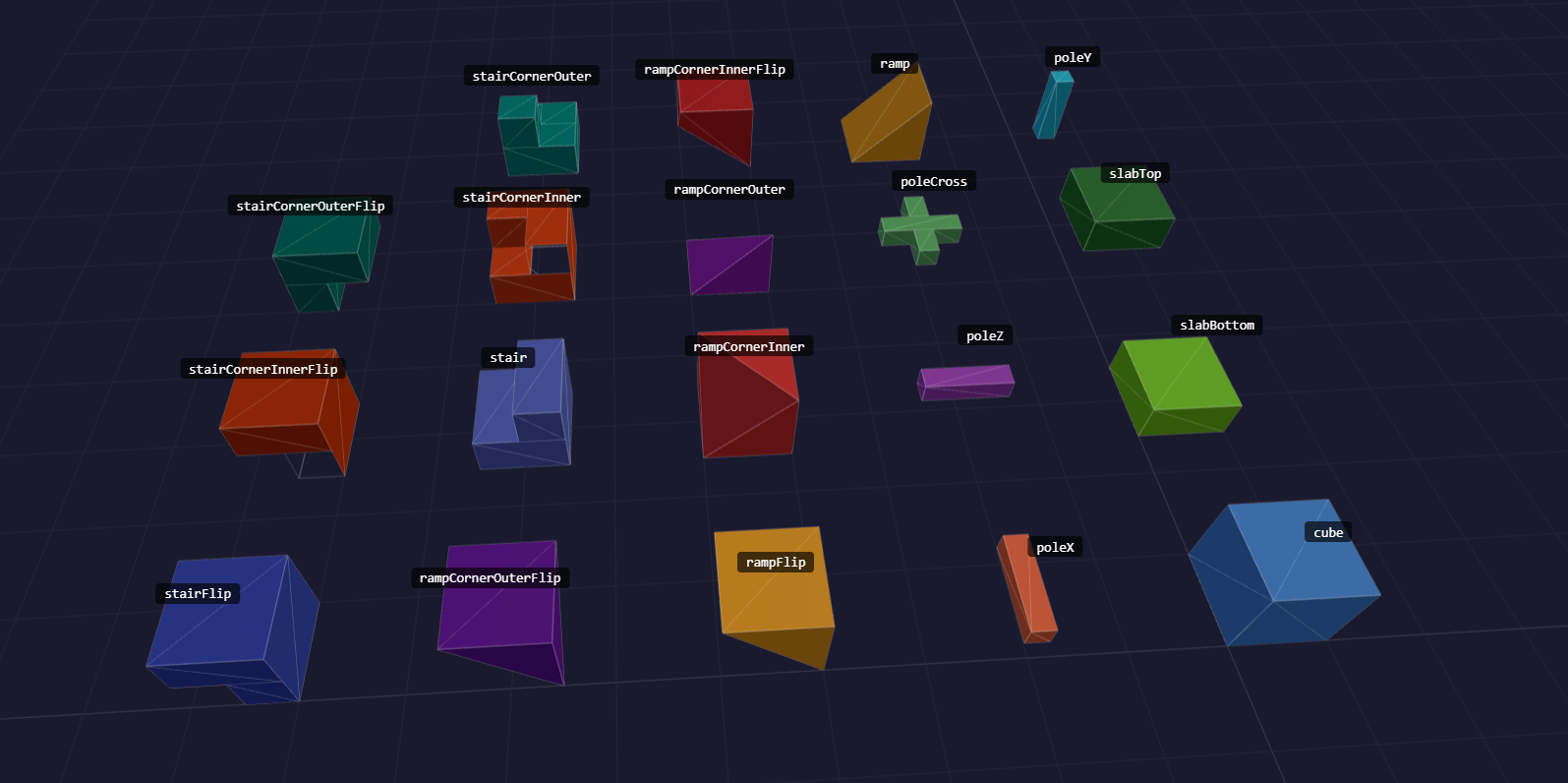
Solid / Slab
All shapes in this category use collisionHint: box.
| Shape ID | Occludes |
|---|---|
cube | All faces |
slabBottom | -Y |
slabTop | +Y |
type SlabType = "top" | "bottom";Passed to the Slab constructor to select which half of the block space the slab occupies. The default is "bottom".
Poles / Beams
All pole shapes use collisionHint: trimesh and occlude no faces (sub-voxel cross-section).
| Shape ID | Occludes |
|---|---|
poleY | — |
pole | — |
Ramps
All ramp shapes use collisionHint: trimesh.
| Shape ID | Occludes |
|---|---|
ramp | -Y, +Z |
rampCornerInner | -Y, +Z, +X |
rampCornerOuter | -Y |
Stairs
All stair shapes use collisionHint: trimesh.
| Shape ID | Occludes |
|---|---|
stair | -Y, +Z |
stairCornerInner | -Y, +Z, +X |
stairCornerOuter | -Y |
Inverted / Upside-Down Shapes (flipY)
Ceiling ramps, inverted stairs, and similar shapes are produced by setting flipY: true on any voxel rather than using a dedicated shape class. flipY mirrors the block geometry around y = 0.5, reverses face winding to preserve correct lighting, and swaps the +Y/-Y occlusion directions so face culling against neighbours remains accurate.
// Ceiling ramp — same geometry as "ramp" but mounted upside-down
vr.setVoxel("Ceiling", {
  position: { x: 2, y: 4, z: 0 },
  blockId: myRampBlock,
  flipY: true
});

// Inverted inner-corner stair
vr.setVoxel("Ceiling", {
  position: { x: 3, y: 4, z: 0 },
  blockId: myStairBlock,
  rotation: VoxelRotation.CW90,
  flipY: true
});
flipY can be combined freely with rotation, flipX, and flipZ.
You can also learn more about Collision here.
Custom Shapes
Implement BlockShape and register the instance via the shapes option or shapeRegistry.register():
import {
  VoxelRenderer,
  type BlockShape,
  type FaceDefinition,
  type Face
} from "@jolly-pixel/voxel.renderer";

class MyShape implements BlockShape {
  readonly id = "myShape";
  readonly collisionHint = "box" as const;
  readonly faces: readonly FaceDefinition[] = [
    // define triangles/quads in 0–1 block space
  ];

  occludes(_face: Face): boolean {
    return false; // return true only for fully covered faces
  }
}

// Option A — at construction time
const vr = new VoxelRenderer({
  shapes: [
    new MyShape()
  ]
});

// Option B — at any time before voxels are placed
vr.shapeRegistry.register(
  new MyShape()
);
Then reference the shape in a BlockDefinition:
vr.blockRegistry.register({
  id: 10,
  name: "Custom",
  shapeId: "myShape",
  collidable: true,
  faceTextures: {},
  defaultTexture: {
    col: 0,
    row: 0
  }
});
See Blocks documentation for more information.